Haoran Yun (yan00115@umn.edu)
Code
https://github.com/HaoranYun/InteractiveSPHFluid
Video
Description
My project is interactive SPH fluid simulator. The key algorithm for simulating SPH is from Clavet et al. (2005). The cool part is that users could interact with the fluid through mouse and control panel. There are two versions of the simulator, 2D version and 3D version.
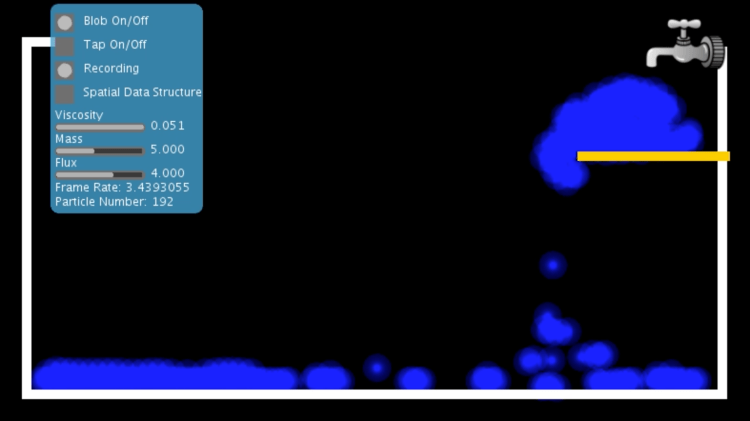
2D Simulator:
Functions in control panel: Users could adjust viscosity, mass, and flux of water tap in the control panel. Users also could control the water tap on and off by clicking the checkbox.
Other interactive functions: Users could move the yellow board by mouse dragging. Users could also play with the particles by mouse dragging.

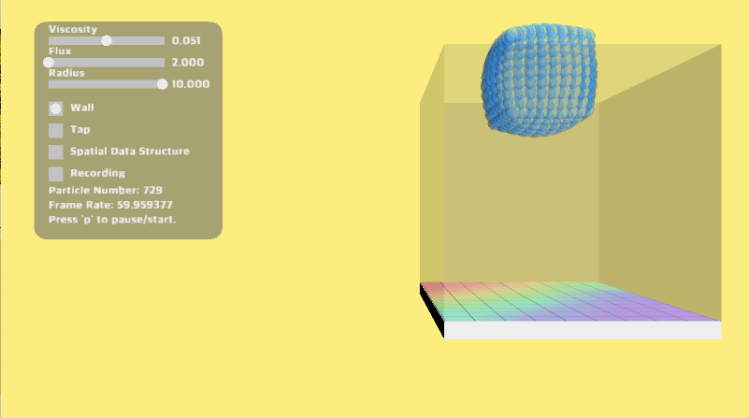
3D Simulator:
Functions in control panel: Users could adjust the radius of particle, viscosity, and flux of water tap in the control panel. Users also could control the water tap on and off by clicking the checkbox.
Other interactive functions: Users could also play with the particles by mouse dragging.
Key Algorithm and Related Work
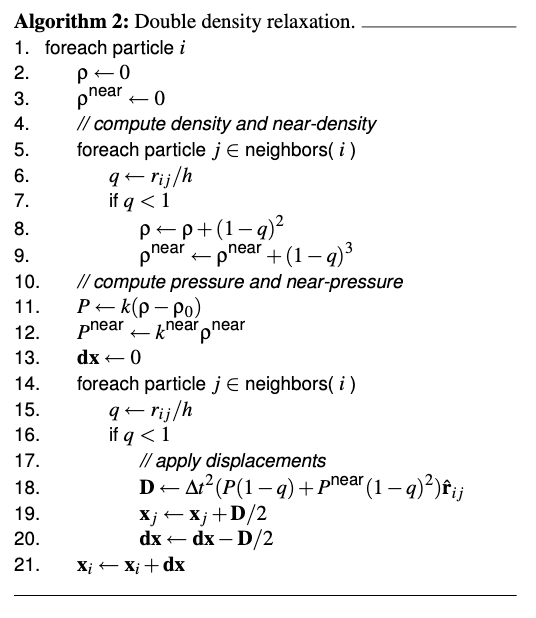
My project, Interactive SPH Fluid Simulator, implemented the algorithm presented in Clavet et al. (2005): Particle-based Viscoelastic Fluid Simulation. Many excellent papers provided great ideas to simulate SPH Fluid. The reason why I choose this one is that it used double density relaxation to simplify the formulation of SPH paradigm. The impulses exchanged between particles depend on two different measures of their neighbor density, density, and near density. In this method, near density and near pressure are the secrete weapons to guarantee coherent fluid representation without clustering. Besides, near pressure and pressure also produced the surface tension effect. In this case, the surface tension is not seen as an external force. Therefore, I do not need to compute the surface tension additionally in my implementation. And the viscoelastic behavior of fluid is formulated as three parts, elasticity, plasticity and viscosity. Virtual springs are introduced to get the elasticity and pair-wise viscosity impulse is used in simulating viscosity.
Challenges
Tuning Parameters: Understanding the key ideas of the paper and implementing the algorithm in codes are not too challenging since the core equations are given in the paper. However, tuning parameters is extremely challenging since there are many potential combinations of the parameters. The parameters include neighbor radius, particle radius, and other k values in the equations. It is the most time-consuming part. After trying hundreds of times, finally, I determined a combination of parameters that guarantee a stable fluid simulation.
Improving Performance: After setting up the parameters, the second challenge is the performance problem. When the number of particles is larger than one thousand, the frame rate will drop quickly, from 60 FPS to 20 FPS. Therefore, I used a spatial data structure to deal with low performance. I learned how to use spatial hash table in SPH fluid simulation from the book, Interactive Simulation of Contrast Fluid using Smoothed Particle Hydrodynamics. In my simulation, the spatial hash table provides a significant improvement. The frame rate is as twice as the original implementation.
Realistic Rendering: In order to render fluids more natural and realistic, I deployed the method of rendering metaball. First, load all pixels and for each pixel check its distance to every particle and accumulate the distance. Then assign color to every pixel based on the accumulated value. This method make the particles look more smooth and water-like. However, the frame rate will drops a lot if using this rendering method, from 60 FPS to 10 FPS.
UI Elements: The last challenging part is implementing control panel and functional UI elements in Processing. In unity, the build-in UI elements could be dragged into the scene and directly used. Things are different in Processing. Although, there are libraries that support UI elements in Processing. Most of them are designed for 2D rather than 3D. Therefore, I wrote my own GUI classes, including slider and checkbox. The design of the layout of 3D version is inspired by this Youtube Video https://www.youtube.com/watch?v=NJBz8rMJ0ZU&t=25s.
Future Work
I think the performance of this project could be improved by using advanced spatial data structure like k-d tree. The spatial hash used here need a lot of memory space and most of them would be empty since the fluids are concentrated in one region.
Reference
Simon Clavet, Philippe Beaudoin, and Pierre Poulin. 2005. Particle-based viscoelastic fluid simulation. In Proceedings of the 2005 ACM SIGGRAPH/Eurographics symposium on Computer animation (SCA ’05). Association for Computing Machinery, New York, NY, USA, 219–228. DOI:https://doi.org/10.1145/1073368.1073400
Grahn, Andreas. (2008). Interactive Simulation of Contrast Fluid using Smoothed Particle Hydrodynamics.
Fluid Simulation / Smoothed Particle Hydrodynamics in Unity. https://www.youtube.com/watch?v=NJBz8rMJ0ZU
 haoranyun.com