This project is finished by Haoran Yun and Haozheng Yu.
Haoran Yun: Cloth simulation & Shallow Water 1D & Shallow Water 2D
Haozheng Yu: Eulerian Fluid Simulation 2D
Checkin
Code
https://github.com/omgYun/animation_as2/blob/master/Checkin/Checkin.pde
Video
Cloth Simulation
Code
https://github.com/HaoranYun/animation_as2/tree/master/ClothSimulation
Video
- 00:00 – 00:12 Use keyboard to control the camera.
- 00:12 – 00:35 Hold LEFT mouse button to drag the ball. The ball is interacting with the cloth.
- 00:45 – 00:46 Hold RIGHT mouse button to drag the cloth to left side.
- 01:03 – 01:09 Press space key to start the blowing wind. The default direction of wind is left.
- 01:09 – 01:16 Press ‘r’ to apply right wind.
- 01:16 – 01:22 Press ‘f’ to apply forward wind.
- 01:22 – 01:33 Press ‘b to apply back wind.
- 01:33 – 01:35 Press space key to end the blowing wind. Press ‘t’ to make the cloth be tear-able.
- 01:40 – 01:55 Hold RIGHT mouse button and move on the cloth to tear it.
Features
- Realtime rendering (The frame rate is shown in the video)
- 3D rendering, with user-controlled camera.
- Real-time user interaction with system
- Keyboard:
- “t” key: start or end the tear-able cloth effect.
- space key : start or end the blowing wind effect.
- “r” key: change the direction of wind to right.
- “l” key: change the direction of wind to left.
- “f” key: change the direction of wind to forward.
- “b” key: change the direction of wind to backward.
- Mouse:
- Hold and drag LEFT mouse button: move the ball
- Hold and drag RIGT mouse button :
- non-tear-able cloth: drag the cloth
- tear-able cloth: tear the cloth.
- Keyboard:
- 3D Mass-spring cloth simulation
- Drag-terms
- 30×30 Cloth with fast, smooth motion and obstacle interaction at 30 FPS
- Eulerian integration (1st order)
- Textured simulated objects
- Billowing/blowing wind effect simulated with aerodynamic drag
- Tear-able cloth
Shallow Water 1D
Description
I used the shallow water equation in 1D from lecture slides.
dh/dt = -dhu/dx
dhu/dt = -d(hu2+ 1⁄2gh2)/dx
Code
https://github.com/HaoranYun/animation_as2/tree/master/FluidSimulation
Video
Features
- Real-time rendering performance benchmarks > 30 FPS
- User-controlled camera
Thoughts
- It’s hard to balance the dt and the how number of updates per frame. After trying many combinations, I chose updating 30 times per frame and setting dt as the 1/2000 of the time between current frame and last frame.
- Although the water moves a little bit faster, there is no chunky water.
Shallow Water 2D
Description
I used the shallow water equation in 2D from lecture slides.
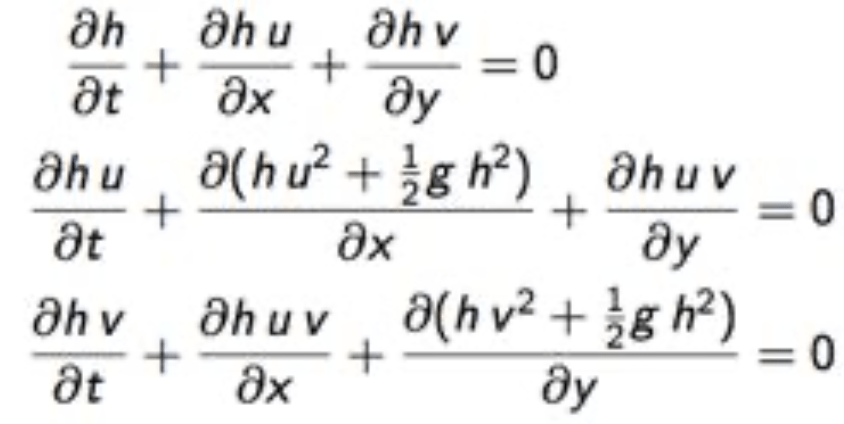
In order to calculate the huv term, I introduced additional array uhm_x, uhm_y, vhm_x, vhm_y to present the velocity u in x and y direction, and velocity v in x and y direction.
Code
https://github.com/HaoranYun/animation_as2/tree/master/FluidSimulation_2d
Video
- 00:00 – 00:05 Press Key R. One rain drop hits the water surface.
- 00:05 – 00:15 Press Key 3. Set rain drop number as three. Press Key R. Three rain drops hit the water surface.
- 00:15 – 00:20 Press Key 5. Set rain drop number as five. Press Key R. Three rain drops hit the water surface.
- 00:20 – 00:27 Move the camera.
Features
- 100 * 100 shallow water with real-time rendering performance > 30 FPS
- User-controlled camera
- Real-time user interaction with system
- key “r” : the raindrops drop on the water surface once.
- key ‘1’, ‘3’, ‘5’: set the number of raindrops as 1, 3 or 5.
Thoughts
- The equations for 2D shallow water provided in lecture slides is not as detailed as the equations for 1D. It took me a lot of time to figure out how to translate the equations into code.
- Since there are so many arrays in same size used here, it is hard to check the correctness of the code.
Eulerian fluid simulation 2D
Description
Our Fluid simulation was based on the Navier-Stokes equation, which was mainly applied in function “advect”. We also applied Gauss-Seidel technique to solve the linear equation in function “linear_solve”.
Code
https://github.com/HaoranYun/animation_as2/tree/master/Eulerian_Fluid_2D
Video
- 00:04 – 00:32 Eulerian fluid simulation.
- 00:09 – 00:32 Achieved 30 fps when the size was 200*200.
Features
- 2D Eulerian fluid simulation
- 100×100 Eulerian Fluid at 20 FPS
- 200×200 Eulerian Fluid at 30 FPS
 haoranyun.com